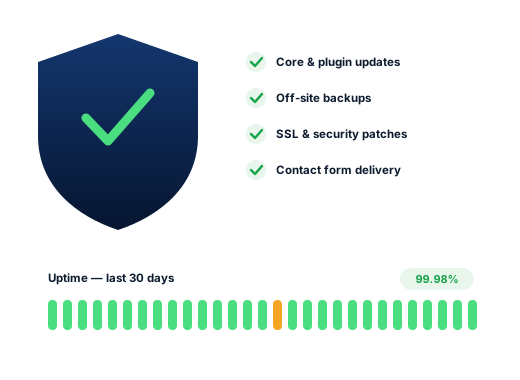
WordPress core
Security releases applied promptlyMinor security releases go on within days. Major versions wait until the plugins you depend on are confirmed to work with them.
Website Maintenance
Updates, backups, security and well-timed content changes for Oakville business websites, so the site stays safe and keeps showing the right dates, hours and offers as the seasons turn.

Look at what Oakville searches for and a calendar appears: oakville farmers market 2026 schedule, oakville jazz festival 2026 schedule, oakville christmas market 2026, oakville santa claus parade road closures, downtown oakville events this weekend. People expect dates, hours and offers to be current, and they notice when a website still promotes last year’s event or a summer patio in December.
Many local businesses move to the same rhythm. Seasonal mooring at the town’s harbours runs from May 1 to October 31, patios open and close, pool and landscaping firms get busy in spring, snow contractors in winter, and downtown shops plan around festivals and the holidays. Each change belongs on the website as well as on Google, and a site that lags behind suggests nobody is minding the shop.
Beneath the content, the software needs attention of its own. A WordPress site is a core system, a theme and a set of plugins from different authors, each updating on its own schedule. Leave them alone for a few months and something eventually gives: a booking form that fails on phones, a contact form that says “sent” while the messages disappear, or a security hole that lets spam pages in. Regular maintenance catches both kinds of drift.
Search demand
Google.ca suggestions from 4 October 2026. None of them is about website upkeep; every one of them punishes a site that has fallen out of date.
Most maintenance plans stop at updates and backups. For Oakville sites we add a content calendar: ahead of each season or local event that affects you, we check your hours, offers, event pages and notices, and remind you about anything that needs your input. When something sudden happens, such as a storm closure, a burst pipe or road closures for a parade, send the details and a clear notice goes up as soon as we can manage it.
Quiet problems
Each can run for months while the homepage looks perfectly fine.
A summer patio menu in November, a holiday promotion in March, an event page carrying last year’s date. Careful readers take it as a sign that the business is not paying attention, or has closed.
The page thanks the visitor, but the email lands in spam or is refused by your mail server. Routing it through a proper sending service and testing every month closes the gap.
Permit rules, fees and regulations change. A landscaper’s page on the private tree by-law or a pool company’s permit guide needs a dated review, or it starts misleading the very people it was written for.
Domain, hosting and analytics were set up years ago under someone else’s email. When a renewal notice goes unread, the site and the company email can disappear together. We list every account and transfer each one to you.
A plugin left unpatched for a year can let an intruder publish pharmacy or casino spam on your domain. Search Console may reveal it before you do, while the pages your customers visit look untouched.
What gets looked after
Each layer breaks for different reasons, so each is checked on a rhythm that suits it.
Minor security releases go on within days. Major versions wait until the plugins you depend on are confirmed to work with them.
The usual source of breakages and break-ins alike. Plugins you have stopped using are deleted outright rather than left deactivated.
The PHP release on your hosting ages as well. Older releases run slower and lose security support, and hosts eventually force upgrades on a timetable of their own choosing.
Rarely touched until something lapses, at which point the site and email can stop at once. We record where each one is held and when it renews.
The work
A restore point is saved, then WordPress, the theme and each plugin are brought up to date, and the pages that earn you inquiries are opened on a phone to confirm nothing has shifted.
Copies of the site kept with a different provider from your host, and restored to a test copy now and then so we know they are usable.
Malware scans, limits on login attempts, two-factor sign-in for administrators, and a quick patch whenever a flaw in one of your plugins becomes public. Former staff accounts are closed.
A monitor requests your homepage around the clock and alerts us when it fails to load.
Once a month we send a test message through every form and booking widget, then confirm with you that it arrived.
New hours, a seasonal menu, an event date, a closure notice or a staff change: send it over and it goes live, guided by a seasonal checklist so nothing is forgotten.
Done carefully
The standards we keep on every account, set down in writing so you can check them.
We log in with our own user, which you can delete whenever you like. The hosting, the domain and the main administrator account never leave your control.
Everyday care (updates, backups, monitoring and small content changes) sits inside the monthly plans. When a site has been neglected for a long time or has already been compromised, the clean-up is a separate one-time job, and you see the quote before we start.
Talk to us about your business
How we work
Four stages that move an Oakville business from easy to miss to hard to overlook.
We read through your site and Business Profile, then record where you rank from different parts of town, Bronte to the Uptown Core.
We settle on the searches worth competing for and give each one a single, focused page.
Profile, page, content and listing fixes, starting with whatever should lift enquiries soonest.
A brief monthly summary of calls, messages and positions, plus the plan for the month ahead.
Questions
Ongoing care comes with every monthly plan ($300 Starter, $500 Growth or $700 Pro, all in Canadian dollars, cancel in any month). If the site needs serious repair first, that clean-up is priced separately once we have inspected it.
Yes. Tell us what changes and when, whether it is extended hours for the Christmas market, a patio closing date or road closures for a parade, and we schedule the updates so they appear and come down on time.
Email us the wording and a banner goes up at the first opportunity. We will also nudge you to mark the day as closed on your Google profile, since many people check there before anywhere else.
Usually, yes. First we audit what is there: the theme and plugins, their versions, where the domain and hosting sit and who can log in. You receive a short written list of risks and a fixed quote for anything that must be put right before routine care begins.
Warning signs include strange pages in Google results, redirects to unfamiliar sites or a browser alert. We keep a copy as evidence, clean out the malicious files and database entries, patch the hole they came through, change every password and, if Google has flagged the domain, request a review once it is clean. This is quoted as a one-time job.
Hosting remains a separate account in your name, paid to the host directly. That way you never depend on us to keep the site online. We are glad to recommend a dependable host and handle any migration alongside you.
Further reading
More on this topic, written for Oakville business owners.
Any of these can be hired on its own; many clients begin with just one.
Every trade is searched in its own way, so each page is researched separately.
A free look at how you rank from Bronte to the Uptown Core, who sits above you on the map and which fixes would count most.
Send me my free audit