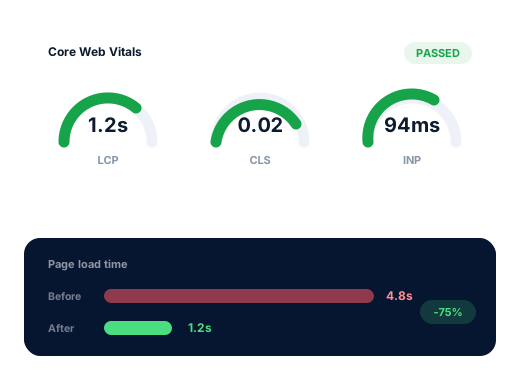
Largest Contentful Paint (LCP)
LoadingHow long until the biggest item in view, usually a photo or headline, finishes drawing. The target is 2.5 seconds or less. Oversized images and a server slow to reply are the common causes.

Speed Optimization
Lighter, quicker pages for Oakville businesses, judged on a phone over mobile data, which is how most of your customers meet your site for the first time.
A large share of Oakville’s searches are made by someone with somewhere to be: oakville open now, oakville restaurants open now, pizza oakville open now, oakville walk in clinic open now, oakville cafes open late. A person on the GO platform, parked on Lakeshore or standing outside a shop that has just closed taps your result and gives the page a few seconds. If it is still loading, they head back and pick the next pin.
Your own view of the site is misleading. At the office it opens over fast wifi on a recent computer whose browser has stored half the page already. A customer meets it cold, on a phone, over mobile data, often while walking. Those first visits are the ones that matter, and Google also uses field data from real Chrome users when it assesses page experience.
The cure is rarely glamorous. Most slow small business sites carry oversized photos, a page builder loading code everywhere, menus or price lists posted as PDFs, and a collection of forgotten add-ons. Removing that weight helps visitors first and rankings second.
Search demand
Google.ca suggestions from 4 October 2026. Nobody searches for site speed by town name; these are the hurried, phone-in-hand searches where a slow page loses the visit.
Not every page deserves equal effort. On Oakville sites the visits that matter most are usually quick and practical: hours checked before leaving, a menu read at the patio rail, a booking form opened on the train home. Analytics tells us which pages those are, and they get attention before anything else. The aim is a pass in Google’s real-visitor data, not a flawless lab score; the last few points almost never bring an extra call.
Usual suspects
Two or three of these together explain most of the slow sites we audit.
Portfolio and gallery pages are the worst offenders: renovation, real estate and salon sites often upload images straight from the camera and display them a few centimetres wide. Each should be resized to the space it fills and saved in a modern format such as WebP.
A menu, fee schedule or class timetable posted as a PDF forces a phone to fetch the entire file and then pinch-zoom through it. Rebuilt as an ordinary web page, the same information opens at once and can appear in search results.
Drag-and-drop builders often load their full library of styles and scripts on each page, including the simple ones that use almost none of it.
Over time a site collects a chat bubble, a review carousel, a social media feed and two or three tracking tags. Each one costs time on every visit, and some no longer serve any purpose at all.
Budget shared hosting can take a long while just to begin sending the page. Caching hides some of it, but when the server itself is the limit, moving host is the honest recommendation.
Google’s three measures
The figures come from visitors using Chrome, pooled over the previous 28 days. To pass, three in four of those visits must hit each target.
How long until the biggest item in view, usually a photo or headline, finishes drawing. The target is 2.5 seconds or less. Oversized images and a server slow to reply are the common causes.
How quickly the page reacts after a tap or click, such as opening a menu or a booking calendar. The target is 200 milliseconds or less. Heavy scripts from chat, tracking and sliders are frequent offenders.
How much content jumps about while the page loads, which causes mistaken taps. Keep it below 0.1 by reserving space for images, banners and late arrivals such as cookie notices.
The work
Before touching anything we save the current lab results and any real-visitor data Google holds for your main pages, so the before-and-after comparison is honest.
Gallery, portfolio and banner photos cut down to the dimensions they actually occupy, compressed, converted to WebP, and set to load lazily below the first screen.
Menus, fee schedules and timetables rebuilt as light HTML, readable on a phone and visible to search engines.
Plugins you no longer need removed; chat, booking and analytics scripts set to load once the page is usable; fonts self-hosted.
Page, browser and, where available, server-level caching configured for your hosting, so repeat visits are quicker still.
Lab scores are rechecked on launch day. The real test comes four weeks or so later, when Google’s 28-day window contains only visits to the faster site.
Done carefully
The standards we keep on every account, set down in writing so you can check them.
Speed removes a reason to leave. It does not create a reason to choose you; that still comes from your content, reviews and reputation.
Page experience is a small part of how Google ranks; the larger benefit is that fewer people abandon the visit. When your pages pass, we will tell you, and suggest whether service pages or your Business Profile would now be a better use of budget. Speed work is quoted as a one-time project after an audit.
Talk to us about your business
How we work
Four stages that move an Oakville business from easy to miss to hard to overlook.
We read through your site and Business Profile, then record where you rank from different parts of town, Bronte to the Uptown Core.
We settle on the searches worth competing for and give each one a single, focused page.
Profile, page, content and listing fixes, starting with whatever should lift enquiries soonest.
A brief monthly summary of calls, messages and positions, plus the plan for the month ahead.
Questions
Two quick tests. Put your homepage into Google’s free PageSpeed Insights tool and look at the mobile tab, starting with the section based on real visitors. Then turn off wifi, close the browser and open your own site on your phone as a stranger would.
A pass on each of the three Core Web Vitals in real-visitor data, meaning the largest content shows inside 2.5 seconds, a tap gets a response inside 200 milliseconds and layout shift stays below 0.1. Pushing past those marks rarely alters how visitors behave.
It can help at the margin, when you and a competitor are otherwise close. The more dependable gain is behavioural: fewer people tap back before your hours, menu or phone number appears.
Usually, yes. A PDF is slow to open on a phone and clumsy to read without zooming. Turned into a normal web page, the same content loads faster, reads better and can be found by people searching for a dish or a service.
The changes themselves typically take one to two weeks on a small site. Confirmation takes longer, since Google’s field report covers the previous four weeks of visits and needs time to fill with new ones.
A fixed one-time price, in Canadian dollars, given after we audit the site, since no two slow sites share the same causes. Afterwards, holding on to the gains is covered by routine care in the Starter, Growth and Pro plans ($300, $500 and $700 a month).
Further reading
More on this topic, written for Oakville business owners.
Any of these can be hired on its own; many clients begin with just one.
Every trade is searched in its own way, so each page is researched separately.
A free look at how you rank from Bronte to the Uptown Core, who sits above you on the map and which fixes would count most.
Send me my free audit